

Callbacks
The PawaPay Merchant API is asynchronous. This is necessary to provide high performance and quality payment infrastructure that is able to process millions of payments every day. When you call any financial endpoint (payout, deposit, refund), the response will confirm whether the transaction is accepted or rejected for processing. A transaction may be rejected due to reasons such as using the same ID more than once or the provider being unavailable at the moment. If the response confirms that the payment has been accepted for processing, it will take some time for it to process (remember that for deposits, the user needs to enter their PIN on their phone). There are two ways to determine the final status of a payment.Polling for status
First, you can use the correspondingCheck Status endpoint for the transaction type to periodically check the status of a payment.
Through callbacks
Second, you can configure callback URLs in the PawaPay Dashboard. This will automatically send a callback to your configured callback URL as soon as a payment has reached its final status. You will have to implement a callback handler that is able to receive calls from our platform and handle them accordingly.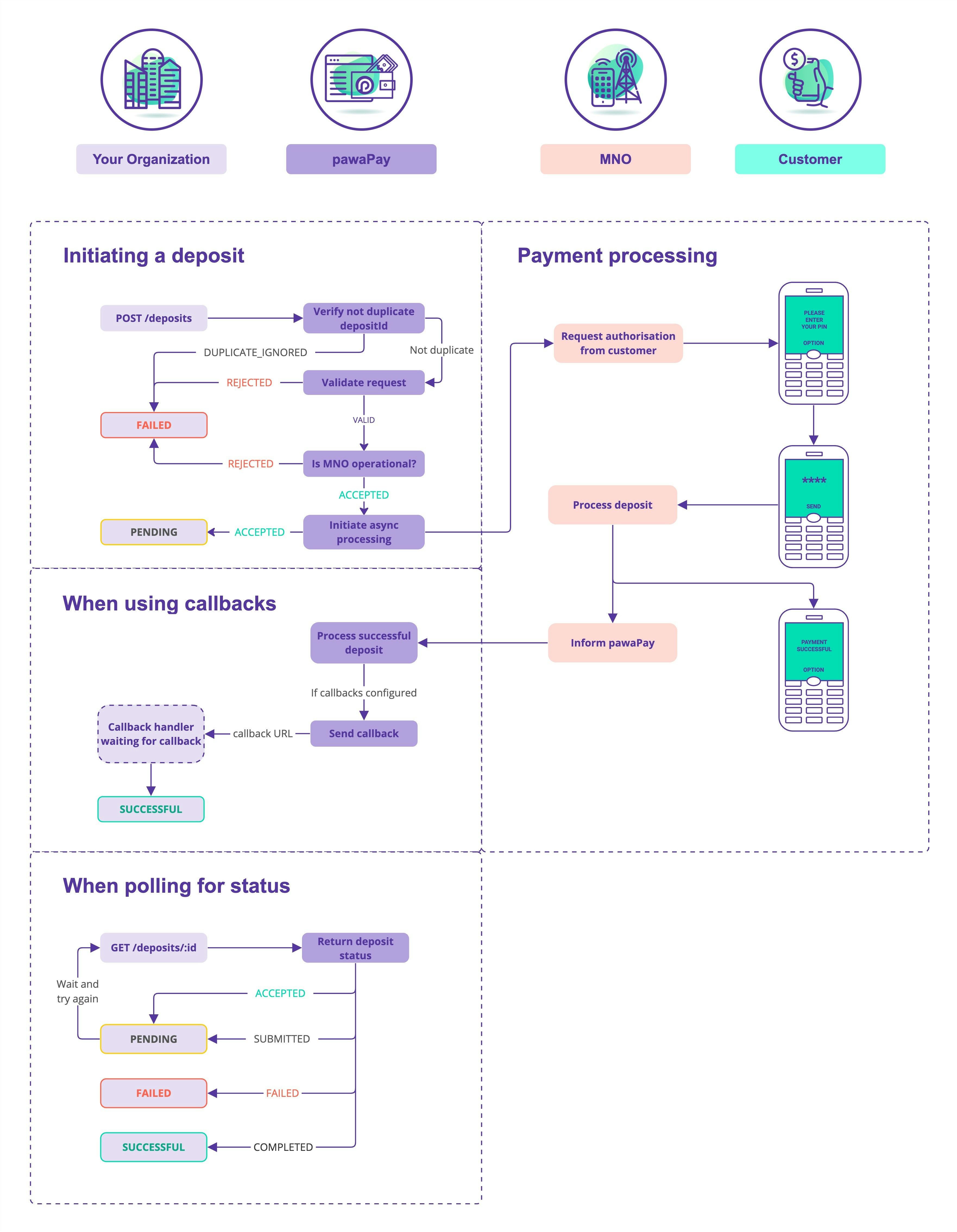
Setting up callbacks
Callback URLs are configured from the PawaPay Dashboard. You can find instructions on how to do that from the PawaPay Dashboard Docs.Handling callbacks
When implementing your callback handler, please consider the following points.- Your endpoint for receiving callbacks must be idempotent.
- Sending a callback more than once for the same payment should not cause a double credit or debit in your system.
- Your endpoint needs to allow us to
POSTthe callback. - Make sure you use an SSL certificate from a trusted CA.
- We will make up to 8 delivery attempts over approximately 25 minutes. See Callback delivery attempts below.
- We expect you to return
HTTP 200 OKresponse to consider the callback delivered. - If the callback delivery fails, you can trigger a resend of the callback within 90 days of the payment being initiated. This can be done by:
- Calling the respective
Resend callbackendpoint - Manually from the PawaPay Dashboard.
- For payments older than 90 days, callbacks can no longer be resent. The status of the payment remains available through the
Check Statusendpoints.
- Calling the respective
- The endpoint should be accessible to our platform.
- Ensure that you have excluded the callback endpoint from your application’s regular authentication system.
- If you are using IP whitelisting, whitelist the below IPs to ensure we can deliver callbacks to you.
Callback delivery attempts
When a payment reaches its final status, we send the callback straight away. If your endpoint does not returnHTTP 200 OK, we try again on the following schedule.
- Times are measured from when the callback is first sent. They are approximate.
- Once your endpoint returns
HTTP 200 OK, the callback is delivered and no further attempts are made. - If attempt 8 (around 25 minutes) also fails, we stop retrying. You can then:
- Resend the callback: deposits, payouts, refunds, remittances.
- Get the final status: deposits, payouts, refunds, remittances.
- Because of retries, your endpoint may receive the same callback more than once. This is why it must be idempotent.
Timeouts and slow responses
- We wait up to 10 seconds to establish a connection to your callback URL and up to 30 seconds for a response. If either is exceeded, the attempt counts as failed.
- Respond with
HTTP 200 OKas soon as you have received the callback and process it asynchronously. Do not hold the connection open while you run your own business logic. - If we detect slow responses or
HTTP 429 Too Many Requestsfrom your callback URL, we may skip some callback delivery attempts to avoid adding to the load on your system.
IPs to whitelist
Callbacks from PawaPay will be coming from one of the IPs listed below.MMO stability
As described in the What’s mobile money section, mobile money transaction chains are complex. This means that the stability of payment services needs to be taken into account when implementing a high-quality payment flow. PawaPay provides multiple solutions to make this easy to manage. Our 24/7 payment operations team monitors all MMOs on our platform for instability and downtime. We stop accepting payments to those MMOs if the success rate is too low. This information is accessible from our provider availability endpoint. You can verify before initiating the payment if the MMO is currently experiencing any problems and inform the user before they attempt the payment. Knowing that your mobile money provider is currently unavailable is a better customer experience than having your payment fail. Failed payments usually take longer to process, leaving the customer waiting for the final result. To provide the best support for your customers, information about MMO availability is also published in the PawaPay Dashboard and Status page. You can subscribe to updates via email, Slack and other channels to ensure your support team is always informed about any potential problems with the MMOs. When an MMO is experiencing difficulties in successfully processing disbursements, our platform will enqueue them to be processed once the MMO is operational. Read more about enqueued payouts. Occasionally, MMOs experience degraded system performance, which can prevent their APIs from returning the final status of payments. During these periods, our platform continues to accept and process payments. We reconcile these transactions through alternative methods using our reconciliation engine. This ensures that, when using PawaPay, all payments are eventually reconciled to their final status. Please note that this process may take slightly longer than during normal operations.Transaction limits
Mobile money wallets have different limits for transactions. Most common and relevant are:- Maximum amount of deposits/payouts in a day/week/month.
- Maximum number of deposits/payouts in a day/week/month.
- Maximum balance of a mobile money wallet.
For example, an MMO has a 1,000 GHS maximum deposit amount. In reality the wallet has a limitation of 1,000 GHS total transaction value per day/week/month. If the user has already transacted 500 GHS during this period, a transaction of 700 GHS might still fail even though it is accepted by PawaPay.You can easily find the transaction limits from our active configuration endpoint.